01
Not having a community
Employees talk anyway, in ungoverned chats you cannot see or correct.
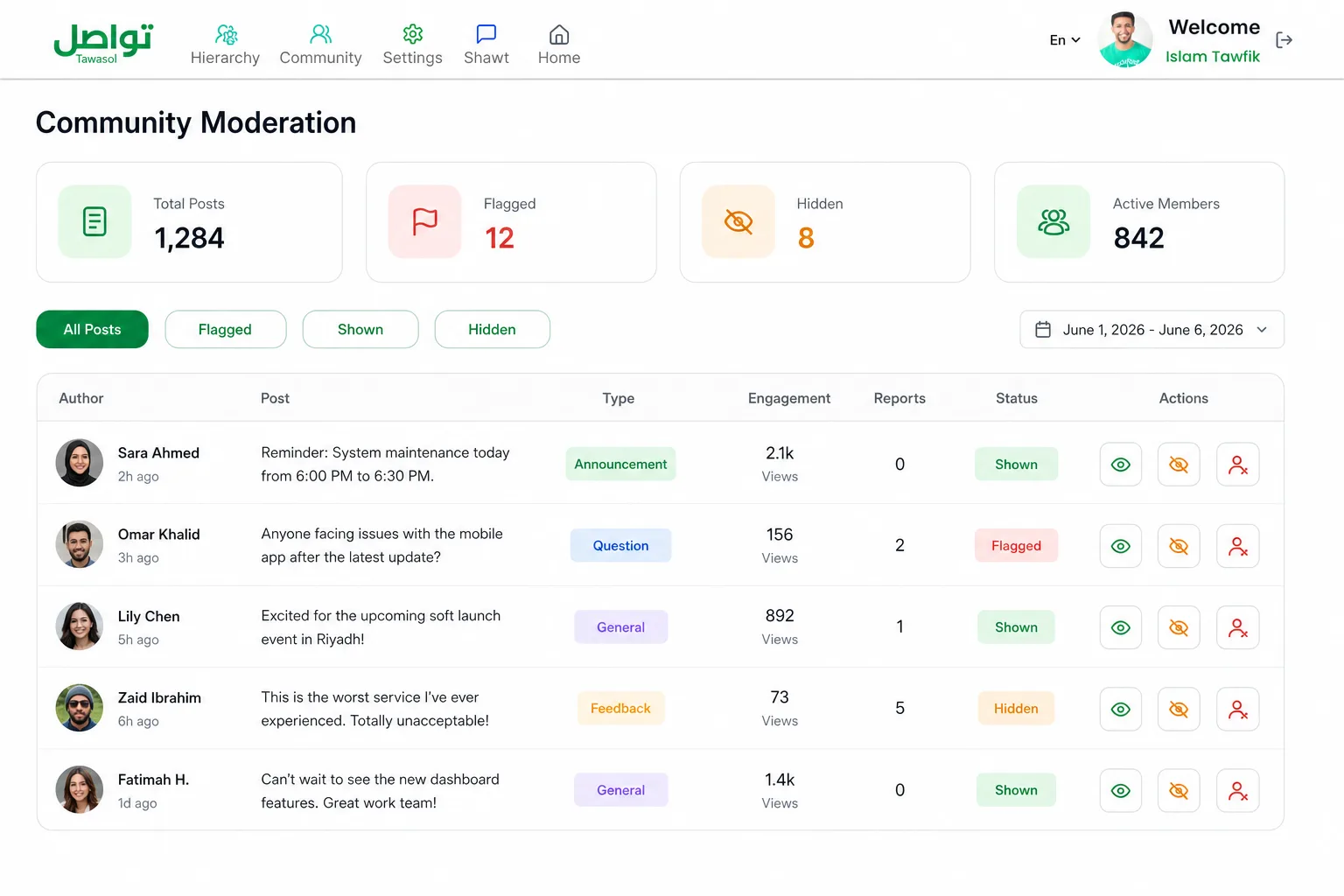
Moderation is a dashboard module in Tawasol for community posts, flagged content and permissions to publish or hide contributions. It connects this work to the organization’s shared structure and access controls, within a platform deployed on the organization’s own infrastructure or in a private cloud.
 AI flaggedThree controls
Product screens and counts are illustrative. Confirm supported controls, limitations and operating responsibilities for your deployment.
The fear is rational. A post crosses a line on Friday afternoon, nobody sees it until Monday, and by then it has travelled further than anything published officially.
Employees talk anyway, in ungoverned chats you cannot see or correct.
Delete visibly and posting stops within a fortnight.
Someone scrolling daily is a salary spent hoping to catch something.
Employee posts from the app.
Reminder: system maintenance today from 6:00 PM to 6:30 PM.
Content containing inappropriate language routes to the flagged queue.
“This is the worst service I have ever experienced. Totally unacceptable.”
Filter to flagged and read in context.
Anyone facing issues with the mobile app after the latest update?
Open context →Show, hide, or block with confirmation before removal.
A post crosses a line at four on Friday. Nobody sees it until Monday. By then it has travelled further than anything the organization has ever published officially.
Posts containing inappropriate language are routed to the flagged queue automatically — before an employee has to report it, and before the weekend.
An employee posts from the mobile app.
Inappropriate content routes to the flagged queue.
Post waits in the moderation queue with full context.
Show, hide, or block applied by a human moderator.
The queue collects flagged items whether or not a moderator is logged in.
Filtering to flagged posts turns daily monitoring into a 5-minute task.
Nothing is deleted automatically. No employee is restricted by an algorithm.
Author, timestamp, type, full content, live counts and reports.
Flagged, shown or hidden, narrowed by date range.
Content passes through automatic screening as it enters the community. Inappropriate language routes to the flagged queue without waiting for a report.
Three controls are available on every post.
One toggle removes posting rights platform-wide.
Three controls on every post, applied by a person and visible in the same moderation table.
Three controls on every post.
Flagged, shown or hidden, by date range.
One toggle removes posting rights platform-wide.
Every post, report and moderator decision remains visible and reversible.
Flagging narrows thousands of posts to the handful requiring a human decision.
Hide, restore or restrict without turning one dispute into a dead community.
The safety layer exists before open posting begins, making approval easier.
Administrative visibility over an internal community is expected. What matters is that action stays proportionate and controlled.
They do not need to watch the feed continuously. Automatic screening surfaces what matters; the filters isolate that queue.
It flags, it does not act. A human reads it in context and decides.
A moderator can use Show to return a hidden post to the feed. The control remains human and visible in the same moderation table.
Moderation covers community posts, flagged content and permissions to publish or hide contributions.
Yes, with author, content, type and engagement counts.
No. It is restorable.
Yes, platform-wide, with one toggle.
It flags. Humans decide.
Yes, alongside flagged, shown and hidden.
We will show the table, filters, and what happens when a post gets flagged.